Want to learn how to make rain sounds in 2026? InsMelo rain sound generator helps you turn a simple idea into a calming, loop-ready rain sound with soft droplets, distant thunder, and a natural flow. You can create a complete rain soundscape that feels peaceful, immersive, and ready for real use without touching recording equipment.

Quick Answer: How to Make Rain Sounds
To make rain sounds with AI, open InsMelo AI Sound Effect Generator, write a clear rain prompt, choose the right duration and loop style, then generate and download the finished sound.
- Describe the rain scene, such as soft rain on a window, heavy rain on pavement, or distant thunderstorm ambience.
- Add details about intensity, surface, mood, and background elements.
- Choose a seamless loop if you need rain sounds for sleep, focus, videos, or games.
- Generate the sound, preview the result, and refine the prompt if it feels too harsh, too thin, or too artificial.
- Download the final rain sound in your preferred audio format for editing, publishing, or personal use.
What Are Rain Sounds
Rain sounds are natural audio textures shaped by droplets, surfaces, space, and low ambience. A soft drizzle can feel warm and sleepy, while heavier rainfall can create a deeper, more cinematic mood. This is why rain ambience works so well when a creator needs calm, focus, or atmosphere without adding melody or dialogue.
Many people search for rain sounds to make you sleep because steady rainfall can soften sudden noise and make a room feel calmer. Gallup's 2024 report found that 57% of U.S. adults said they would feel better with more sleep, showing why relaxing rain ambience still fits modern bedtime routines.
Why Use an AI Rain Sound Generator
Field-recording real rain takes a quiet location, working equipment, and weather that cooperates on schedule. AI rain sound generator skips all three, turning a text description into a finished clip in seconds.
To see the scale of the shift, a direct comparison of both workflows across the metrics that matter most:
| Feature | Traditional Rain Recording | AI Rain Sound Generator |
| Setup | Quiet location, recording equipment | Browser or mobile app |
| Timing | Depends on actual rainfall | Not weather-dependent |
| Intensity control | Determined by the storm itself | Adjustable through prompt wording |
| Loop preparation | Requires manual edit to remove seams | Loop mode built into generation |
| Typical turnaround | Hours to days | Seconds to minutes |

How to Make Rain Sounds with InsMelo
InsMelo AI Sound Effect Generator gives anyone a fast, rain sound maker built for exactly this kind of ambient audio, no production experience needed. This section walks through how to make rain sounds step by step, from a first prompt to a finished, ready-to-use clip.

Steps to Make Rain Sounds with InsMelo
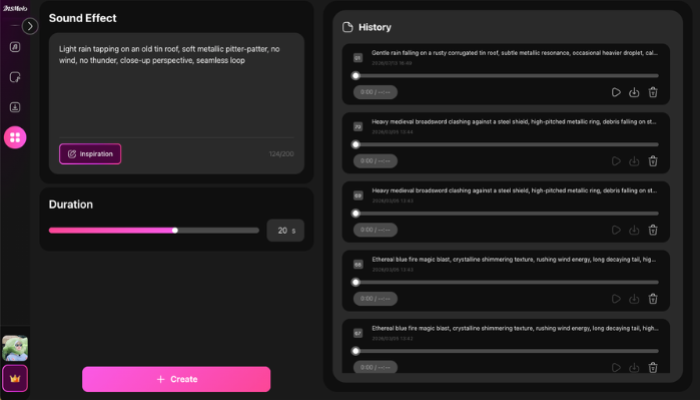
💡From practical prompt writing experience, a vague prompt like "rain sound" can work, but it often creates generic ambience. For more natural results, describe the rain intensity, the surface it hits, the mood, and anything to avoid, such as sharp thunder or sudden volume peaks.



Popular Rain Sound Styles You Can Make
Not every rain sound serves the same purpose, and picking the right style before writing a prompt saves a few rounds of trial and error.
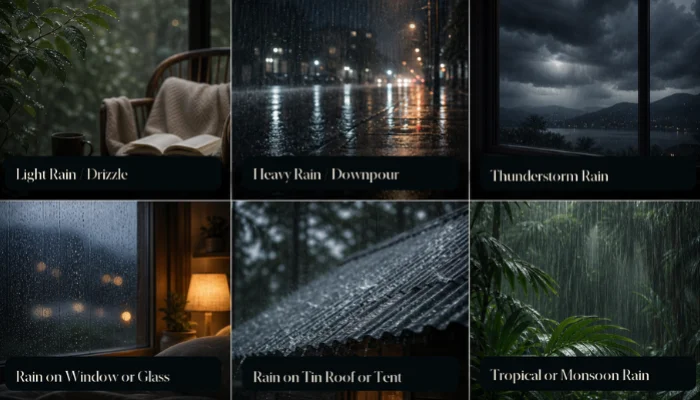
- Light Rain / Drizzle: soft, sparse droplets, best for reading or working with something quiet in the background.
- Heavy Rain / Downpour: a fuller, louder wash that covers traffic noise or a noisy apartment more effectively than a gentle drizzle.
- Thunderstorm Rain: rolling low thunder layered under steady rain, common in video and game ambience, best kept to distant rumbles rather than sharp cracks.
- Rain on Window or Glass: the most requested style among people searching for rain sounds to make you sleep, thanks to its soft, enclosed, "safe indoors" quality.
- Rain on Tin Roof or Tent: a grainier, more textured version favored in ASMR and camping-themed content.
- Tropical or Monsoon Rain: denser, more rhythmic rainfall with a different character than the thin drizzle most stock libraries default to.
Pro Tips to Make Rain Sound Effects More Realistic
Generation is the easy part. A few deliberate prompt choices separate a flat, generic loop from a rain sound that actually feels immersive.
Layer specific details into the prompt.
"Rain sound" alone gives a model almost nothing to work with. "Steady rain hitting a tin roof, occasional wind gust, no birds" gives it an actual scene to render.
Name the surface.
Glass, metal, leaves, and pavement each scatter water differently, and calling one out by name is often the fastest way to fix a track that sounds flat or synthetic.
Keep thunder distant and infrequent for sleep tracks.
A single sharp crack can undo an hour of calm, so how to make rain sound effects for sleep specifically means favoring low, rolling rumbles over anything sudden.
Use post-generation tools to finish the job.
AI Music Extender turns a short loop into an 8-hour overnight track, and Audio Converter handles format changes for whatever platform the file needs to land on.
FAQ About How to Make Rain Sounds
Conclusion
Learning how to make rain sounds no longer requires a microphone, a quiet room, or actual weather. AI rain sound generator like InsMelo turns a short description into a finished, loopable track built in a fraction of the time real-world recording would take.
Anyone still wondering how to make a rain sound from scratch now has a faster, more precise option than a field recorder ever offered.
Open InsMelo's rain sound effect generator and create your first rain sound now.